How to Choose the Best Network Hard Drive for Your Needs?
Choosing a Network Hard Drive can be a daunting task. With numerous models and features available, finding the right fit is essential. This decision directly impacts your storage solutions, data access, and backup efficiency.
A Network Hard Drive allows multiple users to share files seamlessly. Its capacity to store large amounts of data makes it a popular choice for home and office use. However, not all drives are created equal. Some may offer advanced security features, while others may lack essential functionalities.
Consider what you truly need. Do you require high-speed access or simply a large storage space? Reflecting on these questions can lead to a better choice. It's vital to assess storage requirements carefully. Balancing performance and budget is a tricky task. In the end, the perfect Network Hard Drive evolves with your needs, but don’t rush the decision. Take your time to explore, and you might discover options you never considered before.

Understanding Network Hard Drives: Key Features and Benefits
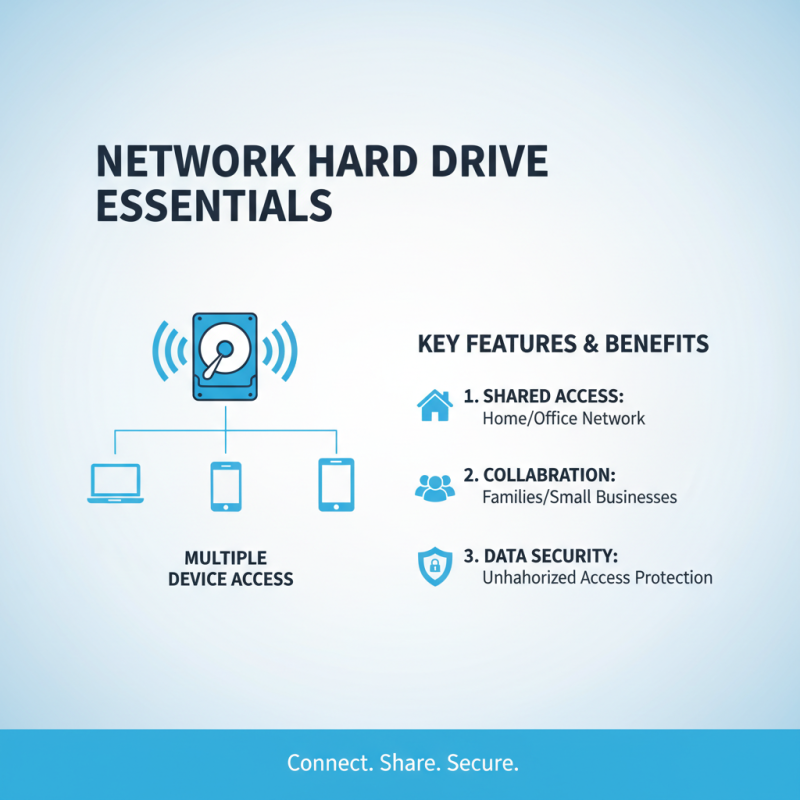
When selecting a network hard drive, it's essential to understand its key features and benefits. A network hard drive connects to your home or office network, allowing multiple devices to access files. This shared access is valuable for families or small businesses. Some models offer advanced security features, ensuring your data remains safe from unauthorized access.
When choosing a device, consider the storage capacity you need. A few terabytes may suffice for basic file storage. However, photographers or videographers might need much more. Also, think about the speed of data transfer. Some drives support faster connections, which can significantly enhance productivity.
**Tip:** Prioritize ease of use. An intuitive interface can save time during setup.
Another vital feature to evaluate is backup options. Look for drives that offer automatic backups. This can save you from unexpected data loss. Many devices also include cloud integration, adding extra layers of access and storage.
**Tip:** Reflect on your future needs. Choose a model that allows for upgrades.
Lastly, consider power consumption. Some drives can be energy-hoggers, leading to higher bills. A well-balanced option might strike the right chord between performance and efficiency. Seek out user reviews to gain insights into real-world experiences, which can help you avoid potential pitfalls.
Assessing Storage Capacity: Determining Your Data Needs
Choosing the right network hard drive starts with understanding your data needs. Assessing storage capacity is crucial. What's the volume of data you generate? Consider documents, photos, and videos. Each type of file takes up different amounts of space. A family might need less storage than a small business. Think carefully about your situation.
Tips: Create a detailed list of your files. Count the number of photos or videos. Estimate their sizes. This will give you a clearer picture of your needs. Use tools that can scan your devices for space usage. You might discover files you forgot about or duplicate data. This exercise can reshape your storage requirements.
Think about future needs. Will your data grow? Planning for expansion is vital. If you expect an influx of data soon, opt for a larger drive. Buying something too small can lead to dissatisfaction soon. Remember, you may not always anticipate your storage needs accurately. Take your time and reflect on your choices.
Evaluating Connectivity Options: Ethernet vs. Wi-Fi Choices
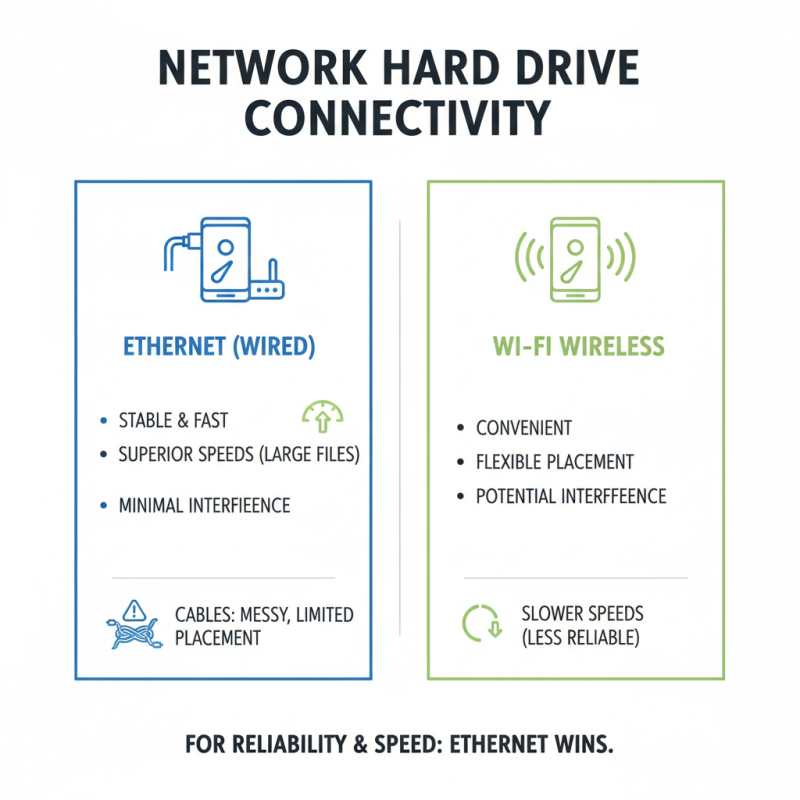
When choosing a network hard drive, connectivity is crucial. Ethernet provides a stable and fast connection. It often delivers better speeds than Wi-Fi, especially for large file transfers. If your setup is wired, you can expect minimal interference. However, running cables can be messy. It may limit your device placement options.
On the other hand, Wi-Fi offers convenience. Wireless access allows devices to connect from anywhere in your home. It’s easy to set up and doesn’t require cluttered cables. However, Wi-Fi speeds can fluctuate. Factors such as distance, walls, and other devices affect performance. This flexibility can be a double-edged sword.
Both options have their benefits and drawbacks. Think about your space and workflow. A wired connection may be reliable for heavy usage, but Wi-Fi enhances mobility. Weigh these choices according to your needs. Consider if the trade-offs suit your lifestyle. Are you okay with potential speed drops for the sake of convenience? Reflect on what works best for you.
Considering Data Security: Encryption and Backup Features
When choosing a network hard drive, data security is crucial. Look for drives that offer strong encryption. Encryption protects your files from unauthorized access. This feature is especially important if you store sensitive information. It adds an extra layer of protection.
Another key feature is backup capability. Regular backups prevent data loss. Consider drives that automate this process. Manual backups are prone to errors. Automatic options create peace of mind. They ensure you have copies of everything important.
Tips: Always check user reviews on encryption effectiveness. Some drives may not encrypt properly. Ensure that the backup system is reliable. A drive might look good but fail in crucial moments. Remember, data security is only as good as its implementation.
Comparing Price Points: Budgeting for Your Network Hard Drive
When choosing a network hard drive, budgeting is essential. Prices vary widely depending on storage capacity, speed, and features. A smaller capacity drive may cost less but may not meet future needs. Aim for a balance between cost and capability.
Consider these tips for budgeting effectively. Research average prices for different storage sizes. This helps set a realistic budget. Don’t ignore additional costs. Accessories like cables or software may be required. Aim to prepare for these hidden expenses.
Think about your actual storage needs. If you only need a few terabytes, spending extra for high capacity might be unnecessary. Reflect on how often you plan to upgrade. In many cases, a less expensive option can provide sufficient longevity. Always factor in your unique use case while considering the price.
How to Choose the Best Network Hard Drive for Your Needs? - Comparing Price Points: Budgeting for Your Network Hard Drive
| Model |
Storage Capacity |
Price Range |
User Rating |
Key Features |
| Model A |
2 TB |
$100 - $130 |
4.5/5 |
Cloud Access, Remote Management |
| Model B |
4 TB |
$140 - $180 |
4.7/5 |
RAID Support, High-Speed Access |
| Model C |
6 TB |
$200 - $250 |
4.6/5 |
Backup Integration, Snapshot Technology |
| Model D |
8 TB |
$300 - $350 |
4.8/5 |
Media Streaming, Multi-User Access |
| Model E |
10 TB |
$400 - $450 |
4.9/5 |
Enterprise Features, Cloud Sync |