Best Ethernet Router for Fast Internet at Home?
Selecting the best Ethernet Router for fast internet at home is crucial. A good router can enhance your online experience significantly. It's not just about speed; it's about reliability and coverage too.
Many people underestimate the importance of a proper Ethernet Router. Often, they settle for their Internet Service Provider’s default router. This choice can lead to frustrating slowdowns and intermittent connections. The right Ethernet Router ensures stable connections for multiple devices simultaneously. The need for efficient home networking is growing, especially with remote work and streaming services on the rise.
When choosing an Ethernet Router, consider factors like speed ratings and features. Look for models that support the latest standards. Also, think about your home's size and layout. Performance can vary between different models in real-world use. Sometimes, even well-reviewed routers may fall short in specific environments. This highlights the need for thorough research before making a purchase.
Understanding Ethernet Routers and Their Importance for Home Internet
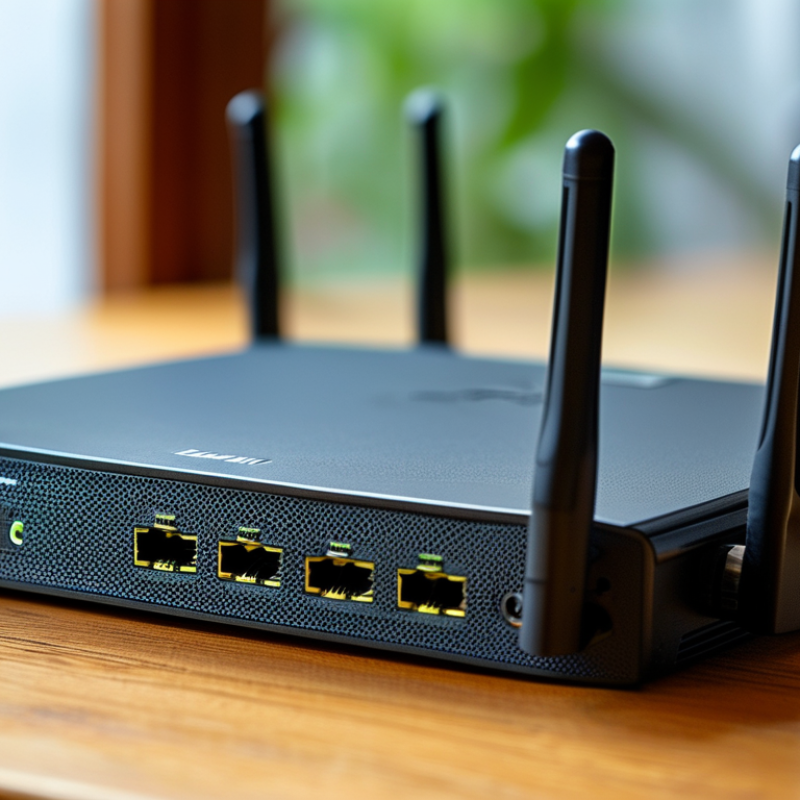
When choosing an Ethernet router, understand its vital role in home internet. An Ethernet router connects your devices directly to the internet. This direct connection provides faster speeds and lower latency than Wi-Fi. It becomes crucial for activities like gaming or streaming in high definition. Any lag can ruin the experience, so reliable equipment matters.
The correct Ethernet router enhances your online experience substantially. A well-suited router offers features like Quality of Service (QoS) settings. These settings prioritize traffic for crucial applications. Many users overlook the importance of firmware updates, which fix security vulnerabilities and improve performance. Neglecting these updates can lead to reduced functionality or security risks.
Not all routers are created equal. Each home has unique needs based on the number of devices and internet usage patterns. Some households may require more advanced routers with ports for wired connections. Reflections on your specific requirements guide the best choice. It’s important to consider what works for your home before making a decision.
Key Features to Consider When Choosing an Ethernet Router
When choosing an Ethernet router for fast internet at home, several key features matter. Speed is a primary concern. Look for routers that support gigabit speeds to maximize performance. This ensures smooth streaming, gaming, and quick file downloads. A good router provides bandwidth management features. These tools help prioritize devices, ensuring that high-demand tasks receive the necessary speed.
Another essential factor is coverage. Assess the size of your home and choose a router that evenly distributes the signal. Be mindful of possible dead zones. Some users find it frustrating when their laptops or smart TVs struggle for a connection. Additionally, consider the number of Ethernet ports. More devices can be connected directly for better stability.
Security features are also vital. Look for routers that offer strong encryption and frequent firmware updates. These aspects are crucial in protecting your network. Some setups require more work than others to ensure security, and overlooking this could lead to vulnerabilities. Choosing the best Ethernet router requires careful thought and consideration, as these decisions directly impact your internet experience at home.
Top Ethernet Routers for High-Speed Internet in 2023
When searching for the best Ethernet router for home use, speed is key. High-speed internet enhances streaming, gaming, and working from home. With 2023’s advancements, options are abundant. Focus on routers that offer robust features like dual-band support, multiple Ethernet ports, and advanced quality of service (QoS) settings. These features ensure stable connections and prioritize bandwidth where it’s needed most.
Many users overlook the importance of firmware updates. Outdated firmware can slow down internet speeds and expose networks to vulnerabilities. Regular updates improve performance and security. Look for routers that provide easy access to firmware management. In addition, consider the layout of your home. A router's placement can impact its efficiency. Testing different locations can often lead to better signal strength.
Moreover, security features should not be ignored. A router with strong encryption protocols protects user data. You can also benefit from built-in firewalls and guest network options. These features may seem basic but are essential for safe browsing. Still, balancing performance and security can be a challenge. Find a solution that fits your needs, as there isn’t a one-size-fits-all answer in this rapidly evolving market.
Best Ethernet Router for Fast Internet at Home? - Top Ethernet Routers for High-Speed Internet in 2023
| Model |
Max Speed |
Number of Ports |
Wi-Fi Standard |
Best For |
| Router A |
1 Gbps |
4 |
Wi-Fi 6 |
Gaming & Streaming |
| Router B |
1.2 Gbps |
8 |
Wi-Fi 5 |
Large Homes |
| Router C |
600 Mbps |
4 |
Wi-Fi 6 |
Streaming & Browsing |
| Router D |
2 Gbps |
12 |
Wi-Fi 6 |
Smart Homes |
| Router E |
1.5 Gbps |
6 |
Wi-Fi 6 |
Mixed Usage |
Comparing Performance: Ethernet Routers vs. Wireless Routers
When it comes to home internet, performance is key. Ethernet routers often outperform their wireless counterparts. They provide a stable connection with lower latency. This is crucial for gamers or for streaming high-definition content. Wired connections minimize interference from other devices, which can be a major issue with Wi-Fi.
Wireless routers offer convenience and mobility. However, they can struggle with speed over longer distances. Thick walls can block signals too. For households with multiple users, this often leads to frustration. The connection might drop during video calls or when accessing large files. While some may prefer the ease of wireless, the reliability of Ethernet can't be ignored.
Despite the advantages of Ethernet, installation can be a challenge. Running cables through walls or ceilings requires planning. Many might wonder if the effort is worth it. Ultimately, the choice between Ethernet and wireless depends on specific needs. Evaluate your internet usage to make an informed decision. Understanding your environment can greatly impact your experience.
Tips for Optimizing Your Home Network with an Ethernet Router
Optimizing your home network with an Ethernet router can significantly enhance your internet experience. A reliable connection helps avoid frustrating slowdowns. Here are a few tips to consider.
Adjust the cable length between your router and device. Use shorter cables when possible. This reduces latency and potential interference. Check your cables for damage. Old, frayed cables can lead to data loss. Replace them if necessary.
Position your router centrally in your home. Walls and large furniture can weaken signals. Keep your router elevated for better coverage. Regularly updating router firmware also ensures optimal performance. Check for updates every few months.
Lastly, consider defining user priorities. If multiple devices are connected, allocate bandwidth to those that need it most. This can often be done through your router settings. Users frequently overlook this option but it can greatly improve connectivity.